After searching for an official MCP from Atlassian and not finding one, I decided to build my own. The existing community MCPs for Bitbucket were too limited—basic repository operations only, no pipeline support, no deployment management.
I needed something more complete for my daily workflow.
Why MCP Matters for DevOps
The Model Context Protocol (MCP) is a standard that allows LLMs to interact with external systems through a defined set of tools. Instead of copying and pasting between your IDE and Bitbucket’s web interface, you can simply ask your AI assistant to handle it.
Context switching is expensive. Every time you leave your editor to check a pipeline, review a PR, or manage branch permissions, you lose focus. MCP eliminates that friction.
What I Built
The MCP Server for Bitbucket exposes 58 tools covering the full Bitbucket API:
Pull Requests
- Create, review, approve, and merge PRs
- Add inline comments on specific lines
- View diffs and compare branches
Pipelines
- Trigger builds on any branch
- Monitor pipeline status and logs
- Manage CI/CD variables
Repository Management
- Full CRUD operations
- Branch restrictions and protection rules
- User and group permissions
Source Browsing
- Read files without cloning the repository
- List directory contents
- Compare commits and branches
Deployments
- View deployment environments
- Track deployment history
Real Use Cases
Here’s how I use it daily:
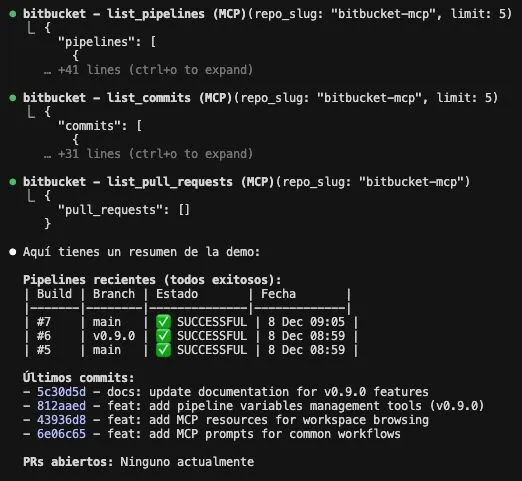
"Show me open PRs and do a code review of #42""Trigger the pipeline on develop and notify me if it fails""Read the config.py file from the feature-x branch""Generate release notes between v1.0 and main"The power isn’t in any single command—it’s in the ability to chain operations naturally through conversation.
Technical Implementation
The server is available in both TypeScript and Python:
# TypeScript
npx mcp-server-bitbucket

# Python
pipx install mcp-server-bitbucket
Authentication uses Bitbucket App Passwords, which you can create in your Bitbucket settings. The server respects rate limits and handles pagination automatically.
Why Bitbucket?
While GitHub has stronger native Claude support, many enterprise teams still rely on Bitbucket. This gap in tooling was exactly why I built this—and why I’ve open-sourced it for others in the same situation.
What’s Next
I’m continuously improving the server based on real usage patterns. Recent additions include webhook management, tag operations, and improved error handling.
If you’re working with Bitbucket and want to integrate it with Claude or other MCP-compatible LLMs, give it a try. Contributions and feedback are welcome.
Check out the GitHub repository or install from npm/PyPI.